
[HOW TO] Root Android with Kingo Android Root
Update 21/07/2015
Kingo Android Root offers every Android user the easiest one-click method to root any Android devices. How to use this universal Android root software to root your Android device? Here we go.
Make sure you get everything right beforehand.
Kingo offers the best one-click Android root software for free. Just download and install it now.
Step 2: Double click the desktop icon of Kingo Android Root and launch it.
After launching Kingo Android Root, you will see its interface as shown below.
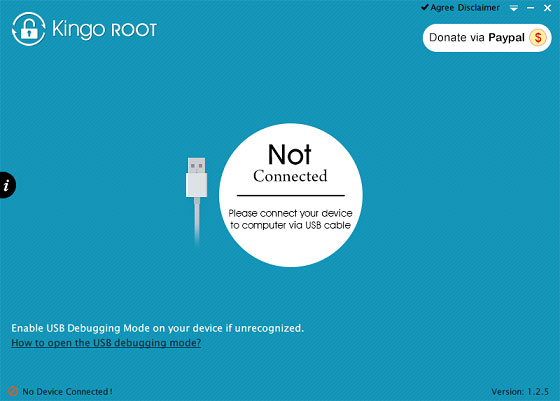
Step 3: Plug your Android device into your computer via USB cable.
If your device driver is not installed on your Computer, Kingo will install it for you automatically. Make sure you get Internet conenction so that device driver can be downloaded. If you are using Windows 8, you may need to change some settings first. When running Kingo Android Root on Windows 8, the issue you may most likely encounter is driver installation looping.
USB Debugging mode enabled is a necessary step of Android rooting process.
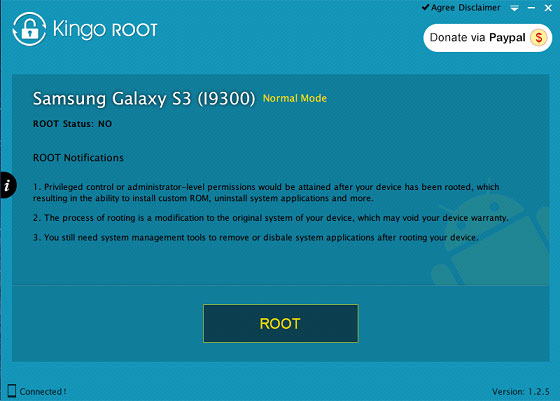
Step 5: Read notifications carefully before rooting your device.
Android rooting is nothing big. However, it is not exactly a small issue either. Rooting your device may open a door for you, and yet with risks.
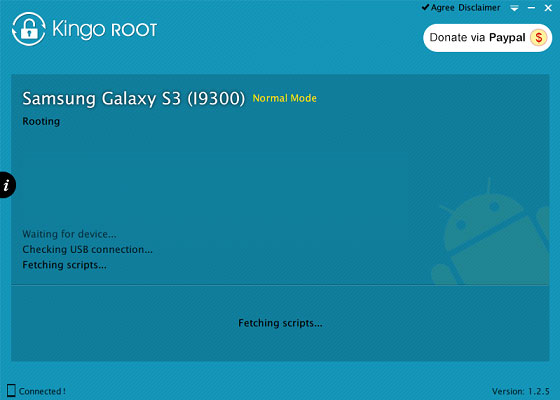
Kingo Android Root will employ multiple exploits on your device, which will probably take a couple of minutes. In the rooting process, your device may be rebooted several times. Do not be panic, it is perfectly normal. And once it begins, please DO NOT touch, move, unplug or perform any operation on your device.
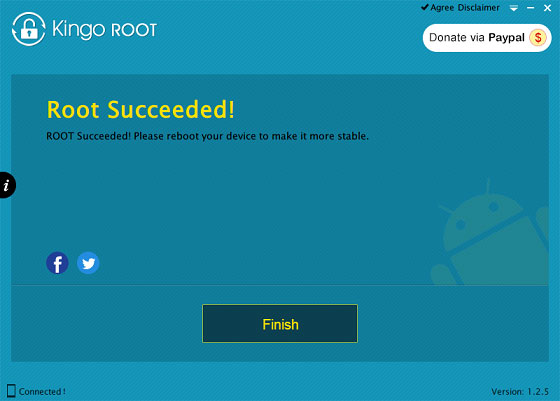
Step 7: Root succeeded, click "Finish" to reboot your device.
Hopefully your device is well supported and successfully rooted by Kingo. Until your device reboots itself, do not operate.
Step 8: Check the root status of your device.
Normally, you will find an app named SuperSU installed on your device after successful rooting.
After rooting your device, you can use tons of fantastic apps to enhance your phone performance and your Android experience. As for me, enjoying Xmodgames- the best free game app for rooted device !
Xmodgames
Update 21/07/2015
Kingo Android Root offers every Android user the easiest one-click method to root any Android devices. How to use this universal Android root software to root your Android device? Here we go.
Make sure you get everything right beforehand.
- Device powered ON
- At least 50% battery level
- Internet connection necessary
- USB Cable (the original one recommended)
Kingo offers the best one-click Android root software for free. Just download and install it now.
Step 2: Double click the desktop icon of Kingo Android Root and launch it.
After launching Kingo Android Root, you will see its interface as shown below.
Step 3: Plug your Android device into your computer via USB cable.
If your device driver is not installed on your Computer, Kingo will install it for you automatically. Make sure you get Internet conenction so that device driver can be downloaded. If you are using Windows 8, you may need to change some settings first. When running Kingo Android Root on Windows 8, the issue you may most likely encounter is driver installation looping.
Step 4: Enable USB Debugging mode on your Android device.
How to solve driver installation looping on Windows 8 when running Kingo Android Root?
USB Debugging mode enabled is a necessary step of Android rooting process.
INPORTANT: Pay attention to your device screen for a prompt window. Tick "Always allow from this computer". If you don't, you will probably get yourself an OFFLINE DEVICE.
What is USB Debugging Mode?
How to enable USB Debugging mode?
Step 5: Read notifications carefully before rooting your device.
Android rooting is nothing big. However, it is not exactly a small issue either. Rooting your device may open a door for you, and yet with risks.
Step 6: Click "ROOT" to root your device.
Android rooting is a modification process to the original system, in which the limitations are removed and full-access is allowed and thus resulting in the ability to alter or replace system applications and settings, run specialized apps and even facilitate the removal and replacement of the device's operating system with a custom one. Rooting your device will immediately void your warranty... Click to know more about Android Rooting.
Kingo Android Root will employ multiple exploits on your device, which will probably take a couple of minutes. In the rooting process, your device may be rebooted several times. Do not be panic, it is perfectly normal. And once it begins, please DO NOT touch, move, unplug or perform any operation on your device.
Step 7: Root succeeded, click "Finish" to reboot your device.
Hopefully your device is well supported and successfully rooted by Kingo. Until your device reboots itself, do not operate.
Step 8: Check the root status of your device.
Normally, you will find an app named SuperSU installed on your device after successful rooting.
After rooting your device, you can use tons of fantastic apps to enhance your phone performance and your Android experience. As for me, enjoying Xmodgames- the best free game app for rooted device !
Xmodgames
NOTE If your device is not supported by Kingo or it fails to root, here are some tips for you.
- Go Troubleshoot sector.
- Save the log file. How to save log of Kingo Android Root?
- Email us to support@kingoapp.com with detailed information of your device such as device model, build number, kernel version and else. Attach the log file would be better.
- Follow us on Facebook (Kingoapp), reply to any post or send us a message.


